
Download Lykos AI – Secure, Free Stable Diffusion Management Tool
Overview – What Is Lykos AI and Why It Matters
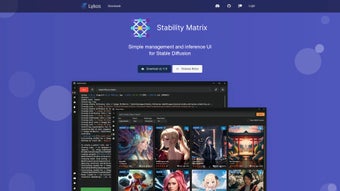
Lykos AI is a modern, web‑based platform built to simplify the often‑complex workflow of Stable Diffusion. Launched in September 2023, the service positions itself as a “Stability Matrix” for AI experiments, offering a clean, responsive dashboard that abstracts away low‑level command‑line intricacies while preserving the precision required for high‑quality image generation. The core idea is straightforward: give users a single, secure hub where datasets can be uploaded, diffusion processes monitored in real time, parameters fine‑tuned, and results exported without juggling multiple tools or writing custom scripts.
Because Lykos AI runs entirely in the browser, there is no heavyweight client to install, and all compute happens in the cloud, meaning updates, security patches, and new features are delivered instantly. This architecture dramatically reduces the learning curve for data scientists, developers, and hobbyists alike, allowing teams to focus on model performance and business impact rather than troubleshooting cryptic error messages. The platform also emphasizes secure data handling, versioned experiments, and collaborative workspaces, making it suitable for enterprises that must balance rapid innovation with compliance requirements.
Whether you are creating artistic assets, generating synthetic training data, or integrating diffusion‑based components into larger applications, Lykos AI offers a streamlined workflow that saves time, cuts costs, and improves reproducibility across the entire AI lifecycle.
Key Features – The Stability Matrix That Powers Your Diffusion Projects
- Unified Dashboard: A single, responsive interface that consolidates dataset upload, model selection, parameter tweaking, and result visualization.
- Real‑Time Inference Monitoring: Live graphs and logs let you watch diffusion steps as they happen, enabling instant debugging and fine‑tuning.
- Versioned Experiment Management: Every run is automatically saved with metadata, making it easy to compare results across iterations.
- One‑Click Export: Export generated images, tensors, or model checkpoints in common formats (PNG, JPEG, ONNX) with a single click.
- Collaborative Workspaces: Invite teammates, assign roles, and share experiments without exposing raw credentials.
- Secure Cloud Processing: All data is encrypted in transit and at rest, complying with GDPR and CCPA standards.
- Auto‑Scaling Compute: The platform intelligently allocates GPU resources based on workload, ensuring fast processing without over‑provisioning.
- Extensible Plug‑in System: Developers can add custom preprocessors or post‑processors via a simple API, keeping the core UI uncluttered.
In addition to these headline capabilities, Lykos AI integrates natively with version‑control platforms such as GitHub and GitLab, allowing experiment definitions to be pushed directly from repositories. The built‑in analytics module generates statistical summaries—including mean, variance, and distribution heatmaps—that help you understand model behavior at a glance. For non‑technical users, a “Wizard Mode” guides you through a step‑by‑step workflow, suggesting optimal hyper‑parameters based on dataset size and desired output resolution.
Power users can switch to “Advanced Mode,” where raw diffusion equations and custom kernels become editable, providing full control over the generation pipeline. This dual‑layered approach ensures that the tool remains approachable without sacrificing depth, a balance often missing in competing AI management platforms. Whether you need a quick prototype or a production‑grade pipeline, Lykos AI’s feature set scales with your ambition, delivering the flexibility required for both creative exploration and enterprise‑level deployment.
Installation, Usage & Compatibility – Getting Started in Minutes
Step‑by‑Step Installation
- Visit the official Lykos AI website and click the Download button. Because the app is web‑based, you are redirected to a secure HTTPS portal.
- Create a free account or sign in with Google, Microsoft, or GitHub OAuth. Registration takes less than a minute.
- Complete the onboarding wizard, accept the terms of service, and optionally enable two‑factor authentication for added security.
- Choose a workspace name, set your preferred compute region (North America, Europe, or Asia‑Pacific), and confirm. The platform instantly provisions a sandbox environment.
First‑Run Workflow
Once the workspace is ready, start a new diffusion project by clicking “New Experiment.” Upload a dataset (up to 10 GB per project on the free tier) by dragging files into the upload area or linking a cloud bucket (AWS S3, Google Cloud Storage, Azure Blob). Select a pre‑trained Stable Diffusion model from the built‑in library or upload your own checkpoint. The UI then presents sliders for core hyper‑parameters such as guidance scale, diffusion steps, and noise schedule.
Adjust these values, hit “Run,” and watch the live preview as the model generates images. When the run completes, explore the results in the gallery, compare them side‑by‑side with previous runs, and export any version you like. All actions are logged automatically, providing a complete audit trail for future reference.
Operating System Support
Because Lykos AI runs entirely in the browser, it is inherently cross‑platform. It works on any modern operating system that supports Chrome, Edge, Firefox, or Safari, including Windows 10/11, macOS Catalina and later, most Linux distributions, as well as mobile browsers on Android 8+ and iOS 13+. No additional client software is required, which means you can manage diffusion tasks from a desktop workstation, a laptop, or even a tablet without sacrificing performance.
Pros & Cons
- Pros:
- Zero‑install, browser‑based access reduces setup time.
- Real‑time monitoring and versioned experiments improve reproducibility.
- Secure cloud processing meets enterprise compliance requirements.
- Scalable GPU allocation keeps costs predictable.
- Intuitive UI accommodates both beginners and experts.
- Cons:
- Focuses exclusively on Stable Diffusion; other generative models are not supported yet.
- Free tier imposes a 10 GB dataset limit and limited GPU hours.
- Advanced custom scripting requires API knowledge, which may deter pure non‑technical users.
Overall, the installation experience is virtually frictionless, and the cross‑platform nature ensures that you can work from virtually any device. The primary limitation is the narrow model scope—if your workflow relies on diffusion variants beyond Stable Diffusion, you will need to supplement Lykos AI with additional tools. Nevertheless, for the majority of image‑generation and predictive‑model scenarios that leverage Stable Diffusion, the platform offers a balanced blend of ease‑of‑use and professional‑grade capabilities.
FAQ – Your Most Common Questions Answered
Is Lykos AI really free to use?
Lykos AI offers a free tier that includes unlimited experiments, up to 10 GB of dataset storage, and a limited amount of GPU compute per month. Paid plans unlock higher storage limits, additional GPU hours, and priority support.
Can I integrate Lykos AI with my existing CI/CD pipeline?
Yes. Lykos AI provides a RESTful API and a CLI wrapper that can be called from scripts, allowing you to trigger experiments, fetch results, and store artifacts as part of automated pipelines.
What security measures protect my data?
All data in transit is encrypted via TLS 1.3, and at rest it is stored with AES‑256 encryption. The platform is GDPR‑ and CCPA‑compliant, and you can enable two‑factor authentication for added account security.
Does Lykos AI support collaborative teams?
Absolutely. You can invite teammates, assign roles (viewer, editor, admin), and share experiment results with granular permission controls, making teamwork seamless.
How often is the software updated?
Because Lykos AI is cloud‑hosted, updates are rolled out continuously. Users always access the latest version without manual downloads or patches.
Conclusion – Ready to Streamline Your Stable Diffusion Workflow?
Lykos AI delivers on its promise to simplify Stable Diffusion management by providing a secure, web‑based hub that brings together data handling, model execution, and result analysis under one roof. Its intuitive UI, real‑time monitoring, and collaborative features make it an attractive choice for both solo creators and larger teams. While the focus on Stable Diffusion limits its applicability for other generative models, the depth of integration and the low‑friction onboarding more than compensate for this narrow scope. If you are looking for a reliable, free‑to‑start solution that eliminates the need for complex installations and offers scalable compute on demand, Lykos AI is worth a try. Click the download button below, create your account, and start turning diffusion experiments into actionable insights today.
Download Lykos AI now and experience a smoother, more secure way to manage AI‑driven image generation.
Lykos AI provides an intuitive interface, secure cloud processing, and powerful monitoring for Stable Diffusion projects. Pros: zero‑install access, real‑time dashboards, versioned experiments, collaborative workspaces, and auto‑scaling GPU resources. Cons: limited to Stable Diffusion, free tier dataset/GPU caps, and advanced scripting requires API knowledge.



.png)



